Claude Code lives in two folders
Claude Code's entire configuration layer is two folders of plain text files. Here's what goes in each one and how to actually use them.
Last Tuesday I had four terminals open. Three VS Code windows. A different Claude session in each — one pulling database schemas, one reading legacy repos, one turning those notes into instructions for an agent I'm building, and one I genuinely cannot account for.
I was alt-tabbing between them like a raccoon checking which trash can had the good stuff. Copy-pasting prompts out of a file called prompts_GOOD.md. Explaining to each session, again, that I'm on Windows, and no, please don't hand me PowerShell paths inside WSL commands.
It worked. It was also dumb.
The fix isn't more terminals. It's realizing Claude Code is configured by files on disk — and once that clicks, you stop doing this by hand every morning.
Two folders hold all of it#
~/.claude/— your stuff. Follows you into every project.<repo>/.claude/— this project's stuff. Lives in git, so your team gets it too.
Both folders take the same files. When they disagree, the project wins. That's the whole override model, and it's why a team can share a setup without stomping on how you personally like to work (fig. 1).
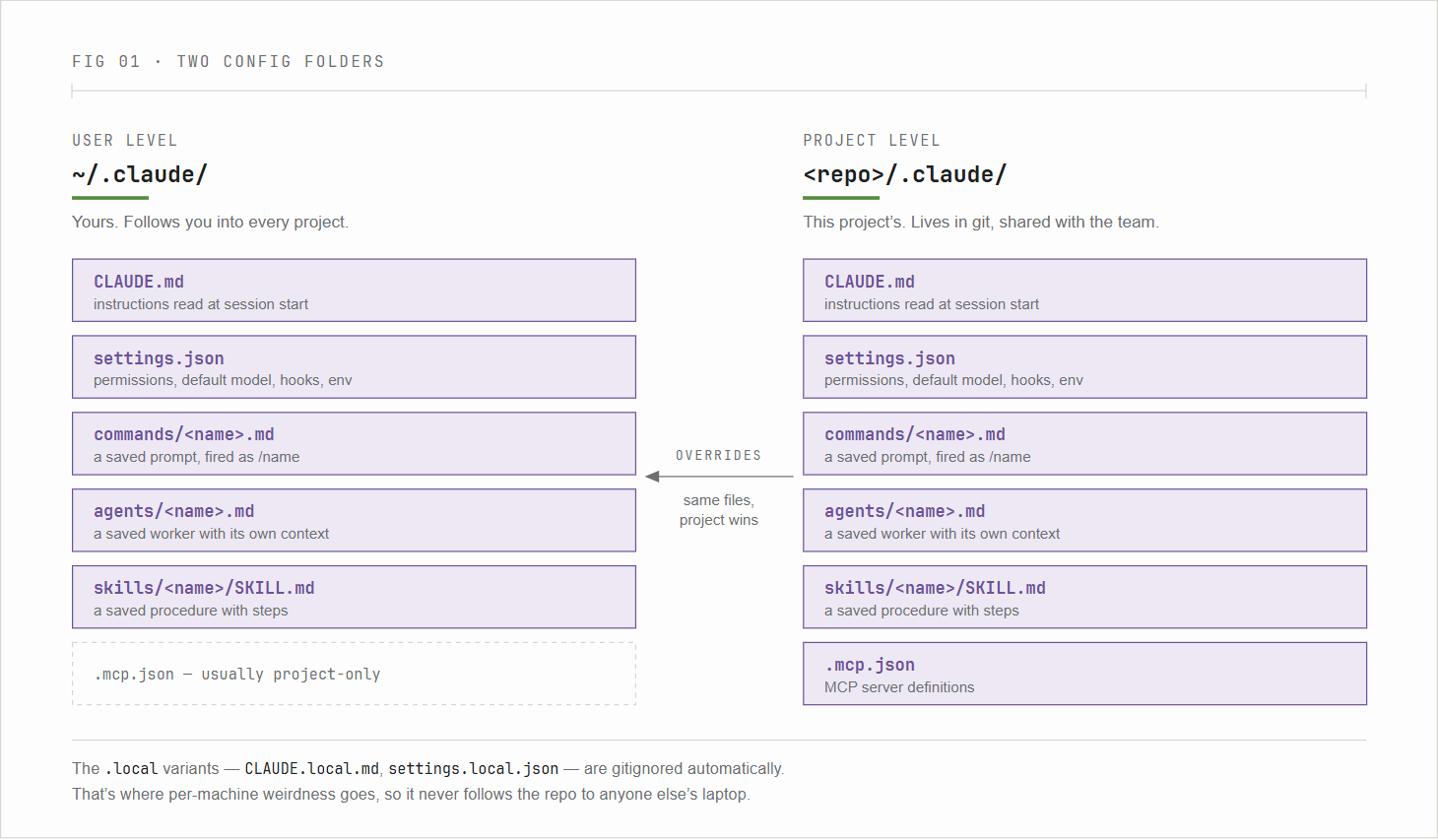
Here's what goes inside either one:
| file | what it does |
|---|---|
CLAUDE.md |
Instructions Claude reads at session start. A system prompt you don't retype. |
settings.json |
Permissions, default model, hooks, env vars. |
commands/<name>.md |
A slash command. /name fires your saved prompt. |
agents/<name>.md |
A subagent — its own job, its own context window. |
skills/<name>/SKILL.md |
A skill. A saved procedure with steps. |
.mcp.json |
MCP server definitions. Usually project-only. |
There are .local versions too — CLAUDE.local.md and settings.local.json. Those get gitignored automatically, so that's where per-machine weirdness goes. The stuff that shouldn't follow the repo to anyone else's laptop.
CLAUDE.md suggests, settings.json enforces#
This is the one distinction that matters most, and it's the one people miss.
CLAUDE.md is context. The model reads it and tries to honor it. settings.json gates whether a tool call actually runs. Write "don't delete files without asking" in CLAUDE.md and you've got a strong nudge. Write it as a deny rule in settings.json and it's a wall, no matter what the model decides it wants to do.
Preferences go in CLAUDE.md. Hard limits go in settings.json.
Here's an example ~/.claude/CLAUDE.md:
# Environment
- WSL2 Ubuntu on Windows. VS Code via Remote-WSL.
- Plans before edits. Small diffs.

# Defaults
- Read-only against any database unless explicitly told otherwise.
- Treat .env, *.pem, anything in secrets/ as off-limits to read.
- Match existing code style in a repo over personal defaults.
And the settings.json that backs it up:
{
  "model": "opusplan",
  "includeCoAuthoredBy": false,
  "permissions": {
    "allow": [
      "Read", "Grep", "Glob",
      "Bash(git status:*)", "Bash(git diff:*)", "Bash(git log:*)"
    ],
    "ask": ["Write", "Edit", "Bash(git push:*)"],
    "deny": [
      "Bash(rm -rf:*)",
      "Read(.env)", "Read(**/*.pem)", "Read(**/secrets/**)"
    ]
  }
}
In the example above: reads are free, writes ask, destructive and secret-adjacent things are simply off the table. Start there and loosen it when something annoys you.
Three things you can save: a prompt, a procedure, a worker#
Commands, skills, and subagents get conflated constantly. They're three different tools (fig. 2).
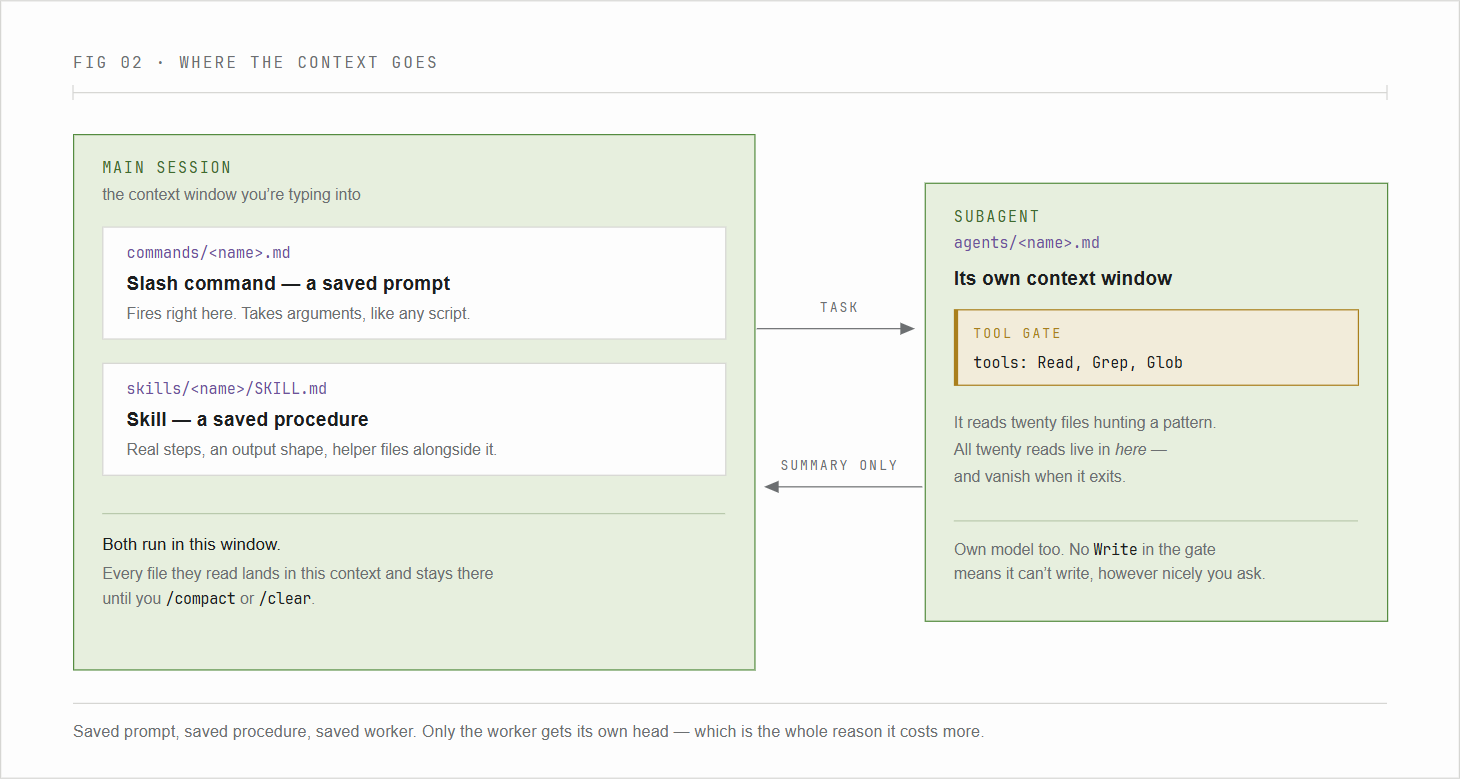
A slash command is a saved prompt. .claude/commands/<name>.md. Reach for it when the wording is the only thing you're reusing. It takes arguments — $1, $ARGUMENTS — same as any script.
A skill is a saved procedure. .claude/skills/<name>/SKILL.md. Reach for it when the work has real steps, expects a specific output shape, or wants helper files sitting next to it — templates, scripts, a checklist.
A subagent is a saved worker with its own brain. .claude/agents/<name>.md. It runs in a separate context window with its own tool permissions. When it reads twenty files hunting for a pattern, only its summary comes back to you. The twenty file reads stay in its context and vanish when it exits.
That last one is the real trick for long sessions, and it's also the expensive one — every subagent carries its own system prompt and context, so fan-out workflows can burn several times the tokens of a single thread. Worth it for parallel work and noisy investigation. Not worth it for a one-line edit.
A subagent is just markdown with frontmatter:
---
name: schema-investigator
description: Read-only DB and schema analysis. Use proactively for schema pulls
  and "what does this table do" questions.
tools: Read, Grep, Glob, Bash
model: sonnet
---
Investigate schemas and report findings. Never modify data or run DDL/DML.

When invoked:
1. Locate connection config without echoing secrets.
2. Enumerate requested objects.
3. Return a tight summary, not raw dumps.
tools is the safety line — an agent without Write can't write, even if you ask nicely. model pins it to a model regardless of what your session is running. And description is what the main session reads to decide whether to hand off work, so write it like a job posting, not a label.
Homework: point it at your scripts folder#
You know the folder. ~/scripts/, or ~/sql/, or wherever the bodies are buried. Forty files named final.py, final_v2.py, final_REAL.py. Three do nearly the same thing. Two haven't run since 2022 and you're not sure whether they're broken or whether the server they talked to just doesn't exist anymore.
Make .claude/commands/inventory-scripts.md:
---
description: Inventory a scripts directory and propose a sane organization
argument-hint: [path]
allowed-tools: Read, Glob, Grep, Bash
model: sonnet
---
Look at directory `$1`. Do not move or delete anything.

1. Find all .py, .sh, .sql, .ps1 files. Group by extension. Note count and size.
2. Read the first 30 lines of each (skip files >1MB). Infer purpose in one sentence.
3. Flag suspected duplicates: similar names, similar imports, similar first lines.
4. Flag risk: hardcoded paths, embedded secrets, references to hosts or databases
   that may no longer exist.
5. Propose a structure by purpose (backups/, db-pulls/, monitoring/, one-offs/,
   archive/), with renames for the `final_REAL_v3` situation.
6. Write the plan to PLAN.md. Do not execute.
Then run it:
> /inventory-scripts ~/scripts
After runs, read PLAN.md. If it isn't unhinged, follow up in plain English: "Execute the plan. Move, don't delete. Write INDEX.md describing every script. Log moves to MOVES.log so I can undo it."
Now you have an indexed scripts library instead of a folder you're mildly afraid of. The first time it works you'll feel a little strange about it. That's correct — you just handed off an annoying chore to a config file you wrote once. The same command works on ~/sql/, on old dotfiles, on the /tmp/stuff/ directory that's been sitting there for two years.
Pick the model per job, not per session#
There's no autorouter for model selection. You get to chose, at whatever time you want: /model live in a session, --model on the command line at launch, or the model key in settings.json as the default, or model: in the frontmatter of a skill or subagent.
Model selection:
| Model | reach for it when |
|---|---|
sonnet |
default. Fits about 90% of the work. |
opus |
architecture, hard debugging, synthesizing across many inputs. |
haiku |
mechanical bulk — renames, formatting, simple transforms. |
opusplan |
your session default when there's real planning. Opus plans, Sonnet executes. |
When it comes to models, opusplan is the sleeper. Most coding work doesn't need Opus writing the edits; it needs Opus deciding which edits. Substantially cheaper, no drop in quality where it counts.
It also runs outside the editor#
claude -p "<prompt>" runs headless. No session, no editor — reads stdin, prints to stdout, exits. Add --output-format json and it's just another thing in a pipeline:
# Triage SSH brute-force attempts from auth.log
cat /var/log/auth.log \
  | claude -p "Group failed SSH attempts by source IP. Output JSON:
               [{ip, count, first_seen, ports[]}]" \
           --output-format json \
  | jq '.[] | select(.count > 10)'
That's the jump from "AI in my editor" to "AI as a step in a script I already had." Log triage, schema docs, cert inventory — a lot of admin chores collapse into one-liners once the commands and subagents exist.
There's a --dangerously-skip-permissions flag that bypasses confirmations. It's named that way for a reason. Sandboxes only. Against anything with real data, that confirmation prompt is the only thing between a runaway tool call and your filesystem.
When it's set up, complex work is one command#
Reading four legacy repos and turning them into a spec for a downstream agent used to be an afternoon and four browser tabs. Configured, it's:
- One session.
/add-direach repo into context. /build-agent-specfans out to arepo-summarizersubagent per repo, in parallel. Each runs Sonnet, read-only, writes tosummaries/<repo>.md.- The same command hands the collected summaries to an
instruction-writersubagent on Opus, which writes the final spec.
One command. The files did the coordinating. And once the interactive version works, the exact same run goes headless with claude -p "/build-agent-spec ..." and lives in cron.
Here's the whole layout:
~/.claude/                    # yours, global
  CLAUDE.md
  settings.json
  commands/<name>.md
  agents/<name>.md
  skills/<name>/SKILL.md

<repo>/.claude/               # this project's, in git
  settings.json
  settings.local.json         # gitignored
  rules/*.md                  # path-scoped instructions
  commands/, agents/, skills/
  .mcp.json
<repo>/CLAUDE.md              # project instructions, in git
<repo>/CLAUDE.local.md        # personal project notes, gitignored
One habit covers all of this: if you've typed a prompt or an explanation twice, it belongs in a file. A CLAUDE.md line, a slash command, a skill, or a subagent. Once the three primitives are clear, picking which one is mechanical.
I still have four terminals open sometimes. Just not for the same job.
Cheat block#
Worth scrolling back to.
In-session slash commands:
| command | purpose |
|---|---|
/init |
bootstrap a project CLAUDE.md from the repo |
/memory |
show all loaded instructions — debug missing rules here |
/model |
switch model live in the current session |
/agents |
create and manage subagents interactively |
/add-dir |
bring another directory into the session's context |
/rewind |
roll back Claude's edits to an earlier state |
/compact |
summarize current context to free token space |
/clear |
reset context entirely |
/ide |
connect an external terminal to a VS Code window |
Keyboard:
| key | action |
|---|---|
Shift+Tab |
cycle Default → Auto-Accept → Plan modes |
Ctrl+Esc |
open the VS Code extension panel |
Ctrl+B |
background a running task |
Alt+K |
insert @file#lines from the current editor selection |
CLI flags:
| flag | purpose |
|---|---|
--model <alias> |
override model for this launch |
-p "..." / --print |
headless, non-interactive |
--output-format json |
parseable output |
--resume |
reopen a past conversation |
--add-dir <path> |
extra working directory at launch |
--dangerously-skip-permissions |
bypass confirmations; sandbox only |